

-
Original price was: £9.99.£7.99Current price is: £7.99. Buy now
Pip, Fin & Willow and the Secret Club
Ellie Jane O'Riley -
Original price was: £9.99.£7.99Current price is: £7.99. Buy now
Pip & Fin and the Great Pond Mystery
Ellie Jane O'Riley -
Original price was: £9.99.£7.99Current price is: £7.99. Buy now
Pip & Fin and the Runaway Supper
Ellie Jane O'Riley -
Original price was: £9.99.£7.99Current price is: £7.99. Buy now
Pip and Beaver Family – the Wobbly Dam
Ellie Jane O'Riley -
Original price was: £24.99.£22.99Current price is: £22.99. Buy now
Exploring Chromebook: 2025 Edition
Kevin Wilson -
-
Original price was: £29.99.£23.99Current price is: £23.99. Buy now
Exploring Windows 11: 2025 Edition
Kevin Wilson -
Original price was: £24.99.£19.99Current price is: £19.99. Buy now
Exploring Apple Mac: MacOS Sequoia Edition
Kevin Wilson -
Original price was: £24.99.£19.99Current price is: £19.99. Buy now
Computer Jargon – 2024 Edition
Kevin Wilson -
Original price was: £24.99.£18.99Current price is: £18.99. Buy now
Exploring Computer Hardware – 2024 Edition
Kevin Wilson -
-
Original price was: £24.99.£12.99Current price is: £12.99. Buy now
Essential Tropical Fish: Species Guide
Anne Finlay












-
Original price was: £9.99.£7.99Current price is: £7.99. Buy now
Pip, Fin & Willow and the Secret Club
Ellie Jane O'Riley -
Original price was: £9.99.£7.99Current price is: £7.99. Buy now
Pip & Fin and the Great Pond Mystery
Ellie Jane O'Riley -
Original price was: £9.99.£7.99Current price is: £7.99. Buy now
Pip & Fin and the Runaway Supper
Ellie Jane O'Riley -
Original price was: £9.99.£7.99Current price is: £7.99. Buy now
Pip and Beaver Family – the Wobbly Dam
Ellie Jane O'Riley

Windows 11 includes a hidden command that opens a folder showing every app installed. Unlike the Start menu, this view lets you create proper desktop shortcuts (including for Store apps),…
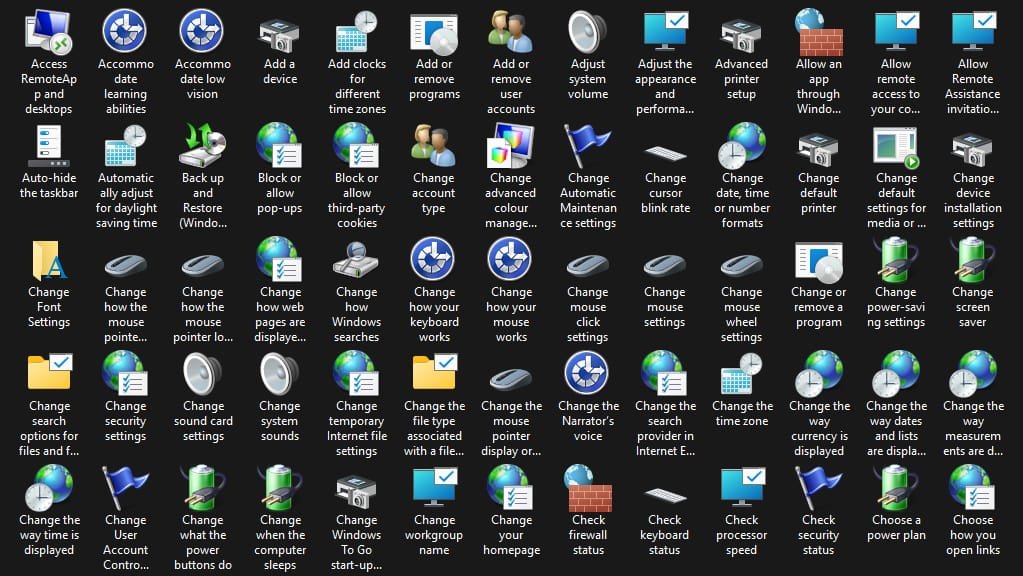
God Mode is not really a “mode” but a special folder that acts as a master control panel. By creating a folder with a specific name, Windows recognizes it as…

By default, the macOS Mail app tries to set up your email account automatically. For major services such as iCloud, Gmail, Outlook, Yahoo, and Microsoft 365, there are built-in configuration…

A slow computer can be incredibly frustrating—especially when you’re just trying to get something done. Whether it’s taking ages to start, freezing randomly, or dragging through everyday tasks, poor performance…

When it comes to 3D printing, achieving a perfectly leveled bed is crucial. Proper bed leveling ensures strong first-layer adhesion, minimizes the risk of warping, and helps prevent potential hardware…

Creating a bootable USB installer is the most efficient way to install or upgrade to Windows 11, especially on systems without a DVD drive or on unsupported hardware. Rufus, a…